
Little Caesars
Little Caesar Enterprises, Inc.Food & Drink
4.773.53K Reviews
- Version
- 26.21.0
- Installs
- 10.00M
- Age Rating
- Everyone
Screenshots
Our Review of Little Caesars
 Analysis by Appyee
If you're a pizza lover like me, then you’ve probably heard of Little Caesars. Known for its "Hot-N-Ready" pizzas, this app brings the convenience of ordering your favorite cheesy delight to your fingertips. I decided to give it a whirl and see if it lives up to the hype.
How the app holds up beyond the first order
I find the app’s lasting value depends less on novelty than on whether Little Caesars already fits your routine. In this section, I look at how a focused ordering tool can stay useful through repeat meals, while keeping the menu’s limits in view. That balance makes it easier to judge what kind of ongoing convenience it actually offers.
First Impressions
Downloading the Little Caesars app was a breeze, and it was up and running in seconds. The interface is clean and user-friendly, which immediately put me at ease. It’s straightforward and doesn't bombard you with unnecessary information. You can tell a lot of thought went into making this app as intuitive as possible.
The first-week appeal is easy to understand: if I already know I want Little Caesars, placing an order on my phone can feel more direct than starting with a general food-delivery app. The app is free, and Little Caesar Enterprises, Inc. is the developer behind it. Its 4.7 average across around 577,000 ratings suggests that many people find it useful, though a high rating cannot promise that every order or store visit will go smoothly.
It is a focused Food & Drink app rather than a broad restaurant discovery tool. That distinction matters. I would open it when I have settled on this chain and want to browse its menu or arrange an order, not when I am still choosing between several kinds of food. If your usual routine begins with comparing nearby restaurants, a general delivery service may be a better first stop.
Easy Navigation
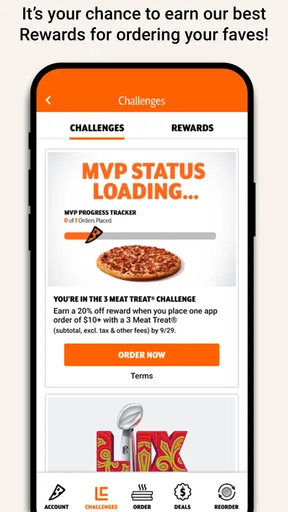
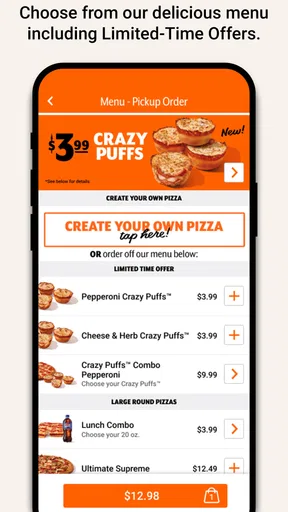
Once you’re in the app, navigating through the menu is super simple. The categories are well-organized, so whether you're in the mood for a classic pepperoni or something more adventurous, you’re just a couple of taps away. I particularly loved the "Deals" section, which highlights current promotions and offers—because who doesn’t love a good deal, right?
A practical habit is to look at the available offers before building an order, then compare the final choices rather than assuming the first appealing promotion is automatically the best fit. That small pause is especially useful when ordering for a group: preferences can vary, and a deal only helps if the combination suits the people eating. I would also decide whether the group wants one shared selection or several different items before browsing, so the menu does not turn a quick dinner decision into a long round of negotiation.
For a realistic weeknight, imagine getting home late and needing to feed a couple of people without making another stop. I would use the app to check the menu and current deals, settle on an order, and choose the most suitable way to receive it. The benefit is not that it removes every decision; it is that I can make those decisions in one place instead of juggling a menu, a phone call, and a separate payment step.
Customization Options
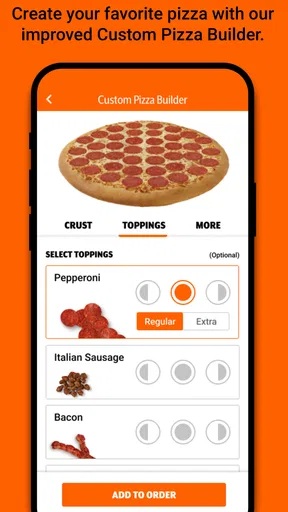
One of the things I appreciated was the level of customization available. You can tweak your pizza to your heart's content, adjusting toppings, crusts, and sauces. It's like having a personal pizza chef at your service. I went for a custom veggie pizza with extra olives and felt like a pizza connoisseur.
Customization is most valuable when someone at the table has a clear preference, but it can also add friction if everyone keeps revising the order. I find it easier to agree on the main choice first, then make only the changes that genuinely matter. Before submitting, I would take a moment to review the completed order as a whole; checking each item together is a simple way to catch a missed topping or an unintended variation before the order is placed.
This is also where the app’s focus has limits. It can help me shape a Little Caesars order, but it does not turn the restaurant into a general-purpose menu with every cuisine or dietary choice. If nobody in the group wants pizza, or if the meal depends on options outside this chain’s menu, browsing a wider selection is the more sensible choice. For a household that regularly wants different foods, the convenience of customization may not outweigh that narrower range.
Order Tracking
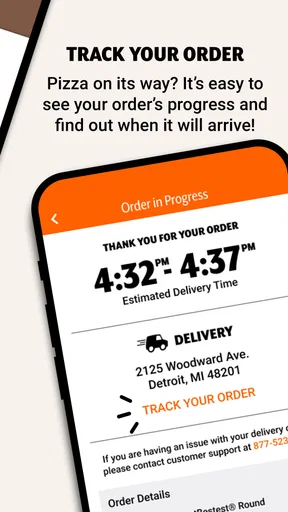
The order tracking feature is pretty nifty. Once you place an order, you can track its progress in real-time. This is a lifesaver when you're starving and need to know when your pizza will arrive. The app updates you at every stage, from prep to out-for-delivery, so you're never left in the dark.
Tracking is useful as a guide for planning, not a reason to time every part of an evening to the minute. I would check it when I need to decide whether to set the table or tell someone food is on the way, while keeping a little flexibility in the plan. For a pickup order, I would still follow the app’s displayed status and use my judgement rather than assuming that a progress update guarantees an exact handoff time.
That distinction helps set expectations: seeing progress can make the wait feel less uncertain, but it does not make the app responsible for every part of preparation or delivery. If timing is critical, I would place the order with enough breathing room rather than relying on a phone screen to make dinner punctual. The app is most helpful when it reduces guesswork, not when it is treated as a promise that nothing can change.
Ease of Payment
Paying for your pizza is seamless with multiple payment options available. Whether you prefer using a credit card, Apple Pay, or PayPal, the app has you covered. I found it reassuring to know that the transactions are secure, giving me peace of mind while indulging in my pizza cravings.
Having a payment method ready can make repeat ordering feel quick, but I would still review the basket and total before confirming. That check is worthwhile when adding customized items or ordering for several people, because a fast checkout is only convenient if it reflects what everyone agreed to. If I am ordering on behalf of a group, I would confirm the selections and payment arrangement first instead of sorting out changes after submitting.
Compared with ordering by phone, an app can make it easier to see what I have selected before paying. Compared with a general delivery app, the choice is less about which screen is prettier and more about whether I want Little Caesars specifically or want to compare restaurants. I would choose the dedicated app for a straightforward chain order; I would use a broader service when restaurant variety is the priority.
User Experience
Overall, the user experience is pretty solid. The app is responsive, and I didn't encounter any lags or crashes during my time using it. The design is sleek, and the layout is intuitive, making it accessible for anyone, from tech-savvy individuals to those who are a bit more technologically challenged.
The app has a longer track record than a one-week novelty: it was released on September 16, 2016, and its current version is 26.1.1. It has more than 10 million installs, costs nothing to download, and is rated for Everyone. Those details make it an easy app to try, but long-term value still depends on how often Little Caesars fits your actual eating habits. If I only order from the chain once in a while, I might prefer to use it when needed rather than make it part of my daily routine.
Maintenance is a modest but real part of keeping any ordering app useful. I would keep it installed if I expect to order again, check that it is up to date when something behaves unexpectedly, and avoid assuming an old basket or past choice still matches what I want today. For an occasional user, removing it between visits is also reasonable; the point is convenience, not collecting apps for restaurants I rarely use.
For regular customers, the recurring value comes from having the menu, order choices, and checkout in one place. That can be worthwhile for a familiar family meal or a routine dinner, while offering less to someone who enjoys discovering independent restaurants or comparing a wide range of menus. The app’s strongest long-term role is practical: it supports a repeated choice, rather than trying to create a reason to eat pizza more often.
The fatigue risk is that repeated ordering can make the same narrow choice feel less appealing. Deals may give me a reason to reconsider what I order, but they cannot replace genuine variety, and customization is not the same as having a different restaurant’s menu. I would not rely on the app as my only food-ordering option. Keeping it as a convenient route for the occasions when this particular pizza sounds right is a healthier expectation.
It is a good fit for people who already like Little Caesars, want to customize a familiar order, or need a convenient way to arrange a meal for more than one person. I would be less likely to recommend it to someone who rarely eats pizza, wants to compare many restaurants in one search, or prefers to decide what to eat only after seeing a broad set of local choices. In those cases, a general food-ordering app or a restaurant’s usual ordering method may suit better.
Customer Support
If you ever run into issues, the app provides easy access to customer support. I tested this out by asking about an order discrepancy, and the response was prompt and helpful. It’s always nice to know there's a real person ready to assist you when things don't go as planned.
That support access is reassuring, but I would still check the order details before sending a question and explain the specific discrepancy clearly. It is a useful fallback when something goes wrong, not a substitute for reviewing choices at checkout. If the issue is time-sensitive, contacting support promptly is more practical than repeatedly refreshing the order screen and hoping the situation resolves itself.
"The Little Caesars app makes ordering pizza quicker and more efficient than ever before."
In conclusion, the Little Caesars app is a great tool for anyone who loves their pizza fast and hassle-free. It streamlines the ordering process, offers a variety of customization options, and keeps you informed every step of the way. Whether you're ordering for a party or just a quiet night in, the app is a reliable companion for your pizza needs. So next time you get a craving for some cheesy goodness, give the app a try and enjoy a slice of convenience.
My lasting verdict is measured rather than unconditional: I would keep it around if Little Caesars is already one of my regular choices, because a focused ordering app earns its place when it makes a familiar meal easier to arrange. If my visits are rare, I would not expect it to transform my routine; I would simply use it when the craving returns. That is where its value feels most genuine—not as a replacement for every way of choosing dinner, but as a handy option when I know exactly which pizza I want.
Privacy and Permissions
See what permissions an app requests and how it handles your data.
- Location
- approximate location (network-based)
- Photos/Media/Files
- read the contents of your USB storage
- Storage
- read the contents of your USB storage
- Camera
- take pictures and videos
- Wi-Fi connection information
- view Wi-Fi connections
- Other
- view network connections, full network access, run at startup, control vibration, prevent device from sleeping, Google Play license check, read Google service configuration
Verdict
Strengths of Little Caesars
- User-friendly interface with easy navigation.
- Quick access to current deals and promotions.
- Order tracking feature keeps you updated.
- Customizable orders to suit personal preferences.
- Rewards program for frequent customers.
Limitations of Little Caesars
- Limited payment options available in-app.
- Occasional app crashes during peak times.
- Delivery area restrictions may apply.
- Inconsistent user experience across devices.
- Lack of detailed nutritional information.
Similar Picks in This Category
View All
Rappi: Food Delivery, Grocery
Rappi, Inc - Delivery3.5

McDonald’s: Cupons e Delivery
Arcos Dorados4.3

Swiggy: Food Instamart Dineout
Swiggy4.7

Blinkit: Groceries & more
Blinkit4.8

foodpanda: food & groceries
Foodpanda GmbH a subsidiary of Delivery Hero SE4.0

Zomato: Food Delivery & Dining
Zomato4.7
Frequently Asked Questions
What features does the Little Caesars app offer?
The Little Caesars app provides a seamless experience for ordering pizza, with features such as a fully customizable menu, easy reordering of past purchases, and a user-friendly interface. You can also track your order in real-time and access exclusive online deals and promotions. The app is designed to make the ordering process quick and convenient for users.
Is there a loyalty program within the Little Caesars app?
While the Little Caesars app does not currently offer a traditional loyalty program, it frequently provides exclusive deals and promotions to app users. By enabling notifications, you can stay updated on special offers and discounts that are only available through the app, ensuring you can save on your favorite pizzas.
How user-friendly is the Little Caesars app?
The Little Caesars app is designed with user-friendliness in mind. Its intuitive layout allows users to navigate easily, customize orders, and complete transactions swiftly. The app also includes a clear and simple checkout process, making it accessible even for those who are not tech-savvy, ensuring a smooth user experience.
Does the Little Caesars app support multiple payment options?
Yes, the Little Caesars app supports various payment methods to streamline the checkout process. Users can choose to pay via credit/debit cards or use digital wallets like Apple Pay or Google Pay. This flexibility allows users to choose the most convenient payment method for their needs, enhancing their overall experience.
Can I use the Little Caesars app for delivery and pickup orders?
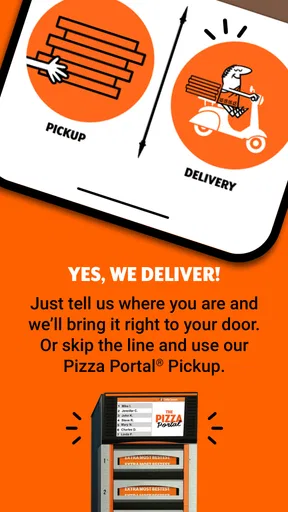
Absolutely. The Little Caesars app allows users to place both delivery and pickup orders. You can select your preferred option during the checkout process. For delivery, the app provides real-time tracking, while the pickup option offers a convenient way to grab your order without waiting in line, especially with the Pizza Portal Pickup feature.
